Export a project, and your credit in the files
Your work stays yours. Export this project gives you one ZIP with everything CullTone has for a shoot, so you can keep it without CullTone. And your name, copyright and contact go into every photo CullTone delivers.
- Owners and editors
- No face data in exports
Export a project
-
Open Project settings
On the project's Overview, scroll down to Project settings and find Export this project.
-
Check the size
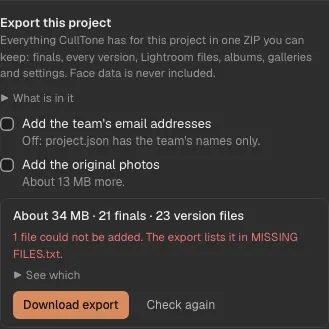
Press Check the size. You see how big the ZIP is and what is in it, for example "About 2.4 GB · 312 finals · 640 version files · 1 album", and any file the server does not have.
-
Choose what to add
The owner can add the team's email addresses (otherwise the team is listed by name only). For a cloud project, you can add the original photos you uploaded.
-
Download
Press Download export. The server makes the ZIP while it downloads, so it starts at once. It works on a phone too. A large export needs a steady connection: if it stops, it starts again from the beginning.
-
Every project
Settings → Export all projects lists every project with its own Download: one ZIP per project, never one giant file.
What is in the ZIP
- finals/: the version you deliver of every Keep, named like the original (DSC0001.ARW gives DSC0001.jpg). A virtual copy is named "DSC0001 (copy 2)".
- versions/: every version of every photo (v1.jpg, v2.jpg and so on) with a versions.json that says what made each one, what it was built on, the prompt and what it cost.
- xmp/: one file per photo for Lightroom Classic, with the stars, colour label and edit.
- albums/: each album's PDF for print and spreads ZIP (with the print notes), as CullTone Desktop last made them. Make them in the album first with PDF for print and Spreads (JPEG ZIP); an album without them is listed as missing.
- decisions.csv: Keep, Review or Archive for every photo, the reason, whether you or CullTone decided, and the people you named in it.
- galleries.json, project.json, people.json and originals.txt: gallery links and your clients' favourites and comments, the project's settings, the names you gave in People (only when People is on), and where the originals are.
- Never in it: face data of any kind. CullTone keeps it only to group people and never exports it.
Desktop projects
- A desktop project's original RAW files stay on its main computer, so they are not in the ZIP. originals.txt lists their names, sizes and where they are.
- If some versions never reached the server, the export says which, and names the computer that has them.
- On that computer, open the project in CullTone Desktop and press Build on CullTone Desktop. Pick a folder: CullTone writes the same folders there, with the files only that computer has.
Your credit and copyright in every photo
-
Set it once
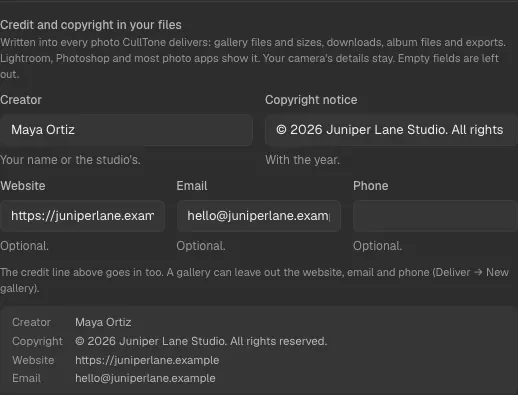
In Settings → Gallery branding → Credit and copyright in your files, type your name (Creator) and a copyright notice with the year. Use fills in a suggestion like "© 2026 Asha Rao Studio. All rights reserved." Website, email and phone are optional.
-
Where it goes
Into every photo CullTone delivers: gallery photos and their sizes, single downloads and Download all, album files, collages, and the finals and versions of an export. Lightroom, Photoshop and most photo apps show it as the creator, copyright and contact.
-
Your camera's details stay
CullTone adds to the file's information and changes nothing else: camera, lens and exposure stay as they were.
-
Per gallery
In a new gallery, tick Leave out contact details to keep your name and copyright but not your website, email and phone. A gallery takes the credit when it is built: rebuild it after you change the credit.